To cancel a subscription, find out who bills you, cancel it there before the next renewal date, keep the confirmation and check your next statement to make sure the charges stopped. If they did not, you can dispute the charge with your bank or card provider.
This guide covers finding forgotten subscriptions, deciding which to keep, cancelling without surprises and what to do if a company keeps charging you. The steps reflect US consumer guidance from the Federal Trade Commission. Examples use US dollars and invented figures.
Who bills you decides where you cancel
The most common reason a cancellation fails is cancelling in the wrong place. Use the receipt email or the account where you signed up to see who takes the payment, then cancel there:
| How you signed up | Who usually bills you | Where to cancel |
|---|---|---|
| Inside an app on an iPhone or iPad | Apple | Subscriptions in your Apple account settings |
| Inside an app on an Android phone, through Google Play | Google Play | Subscriptions in Google Play, signed in to the account that paid |
| On the company’s own website | The company | Your account settings on its website, or its support team |
| Added to a phone, internet or TV bill | The provider whose bill it appears on | That provider’s account or support |
| Through someone else’s family or shared plan | The plan owner | Ask the owner to remove you or end the plan |
The step-by-step routes for Apple and Google Play are in Step 3. If you are not sure, check both app store accounts before contacting the company.
Step 1: Find every subscription you pay for
Subscriptions are easy to lose track of because they renew quietly. Check four places:
- Bank and card statements. Look through the last three months for charges that repeat on a similar date. Then scan back a full year for charges that renew annually, which are the easiest to forget.
- Your email. Search for words such as “receipt”, “renewal”, “subscription”, “trial” and “your plan”.
- Your phone’s app store account. Subscriptions bought inside phone apps are usually billed by the app store and listed in the subscriptions section of your app store account, not on the provider’s own website.
- Accounts you share. A family member may be paying for a plan you use, or you may be paying for one they started.
The Federal Trade Commission advises monitoring your card and bank statements so you know right away if you are charged for something you did not order, and it notes that free trials can turn into paid subscriptions if you do not cancel in time.
Step 2: Decide what to keep
For each subscription, note the price, how often it bills and how often you actually use it. Converting everything to a yearly cost changes how many decisions look: $4 a week is $208 a year. The subscription cost calculator does this conversion for any mix of weekly, monthly and yearly charges.
Then sort each one:
- Keep if you use it often and would pay for it again today.
- Downgrade or pause if a cheaper tier or a seasonal pause covers what you use.
- Cancel if you have not used it in the last month or two, or you have two services doing the same job.
Step 3: Cancel or stop the subscription the right way
The FTC’s advice is to contact the company that runs the subscription and follow its cancellation instructions if it has them. A few practical points help it go smoothly:
- Cancel where you subscribed. A plan bought through a phone app store is usually cancelled in that store’s subscription settings. Deleting the app does not cancel it.
- Cancel before the renewal date. Check whether you keep access until the end of the period you already paid for. If you do, cancelling early costs you nothing and removes the risk of forgetting.
- Watch for offers to stay. A discount offer is fine if you want it, but make sure you end up on the option you chose.
- Turn off automatic renewal for trials as soon as you start one, if the service allows it.
Cancel a subscription billed by Apple
On an iPhone, open Settings, tap your name, then Subscriptions. Choose the subscription and tap Cancel Subscription. Apple says that if there is no Cancel button or an expiration message appears in red, the subscription is already cancelled. Follow Apple’s current cancellation instructions for your device or the web.
Cancel a subscription billed by Google Play
Sign in to the Google Account used for the purchase, open your subscriptions in Google Play, select the plan, then choose Cancel subscription and finish the prompts. Uninstalling the app does not cancel the subscription. Use Google Play’s cancellation instructions and check another Google Account if the plan is missing.
If the subscription is not listed
Check the receipt and statement to identify who bills you. A subscription paid directly to a company may need to be cancelled on its website or through its support team, even if you use it in a phone app. Match the billing account before trying again, then save the cancellation confirmation.
Turning off recurring billing is not the same as removing your card
Turning off automatic renewal in your account is a cancellation: you usually keep access until the paid period ends, and no further charge is made. Deleting your saved card or letting a payment fail does not tell the company you want to stop, so the account can stay open with a balance owed. Cancel through the company’s own process first, then remove the card if you no longer want it stored.
Step 4: Keep proof that you cancelled
The FTC recommends keeping a copy of your cancellation request, along with notes about any conversations you had about cancelling. In practice, that means saving the confirmation email or a screenshot of the confirmation page, and writing down the date, time and name of anyone you spoke to. This record can help your bank or card provider review a dispute if the charges continue.
Step 5: Check your next statement
After the date the next charge would have arrived, look at your statement again. Cancellations sometimes fail without an error, especially when a plan was bought in one place and cancelled in another.
If the charges do not stop
If a company keeps charging you after you cancelled, the FTC says you can dispute the charge with your credit or debit card company, online or by phone, and follow up in writing to protect any rights you have. If you were charged for a subscription you did not agree to, the FTC also suggests reporting it at ReportFraud.ftc.gov or to your state attorney general. These options are specific to the United States; outside the US, check your local consumer protection agency.
A cancellation tracker you can copy
This invented example shows the tracker filled in after a statement review. The household finds five subscriptions, keeps two and cancels three.
| Service | Price | Decision | Yearly cost |
|---|---|---|---|
| Video streaming (second service) | $15.49 a month | Cancel | $185.88 |
| Fitness app | $59.99 a year | Cancel | $59.99 |
| News site | $8.00 a month | Cancel | $96.00 |
| Music streaming | $10.99 a month | Keep | $131.88 |
| Cloud storage | $2.99 a month | Keep | $35.88 |
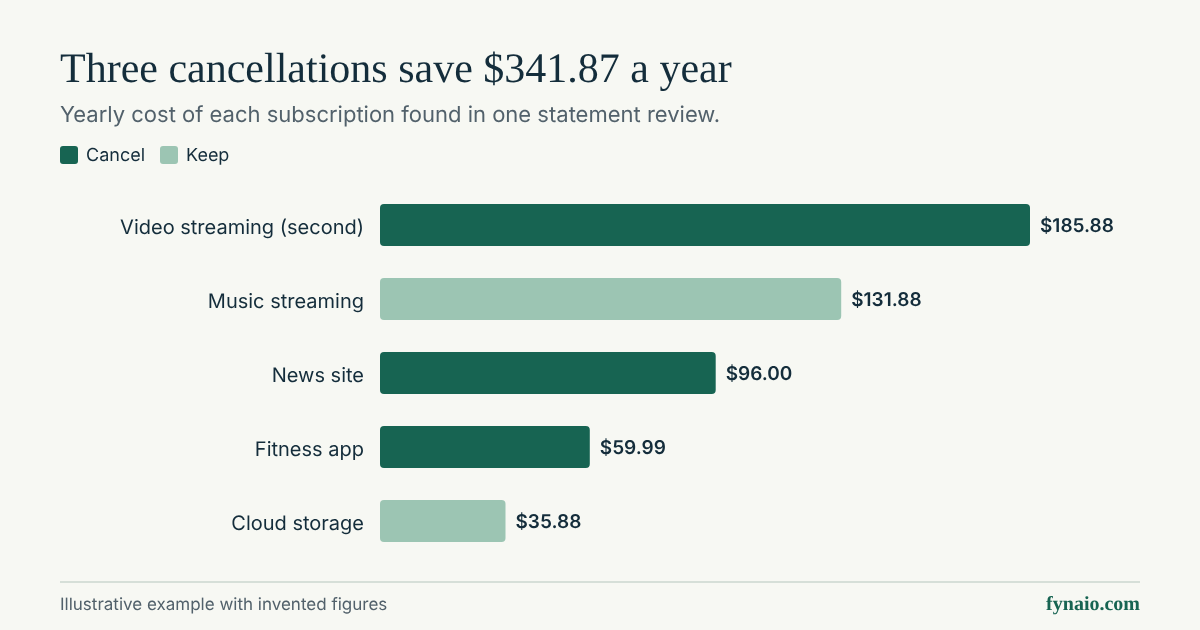
The three cancellations save $341.87 a year ($185.88 + $59.99 + $96.00). For your own version, add these columns to a spreadsheet or the monthly budget template download:
- Service name and what it is for
- Price and billing cycle (weekly, monthly or yearly)
- Next renewal date
- Where it is billed (company website, app store or another account)
- Decision: keep, downgrade, pause or cancel
- Date cancelled and where the confirmation is saved
- Next statement checked (yes or no)
Make the savings count
Money freed up by cancelling disappears into everyday spending unless you give it a job, such as a line in your monthly budget. Set up an automatic transfer for the amount you saved, and point it at a goal with the savings goal calculator. Repeat the review every six months, or whenever you start a free trial, so new charges do not build up again. For other recurring costs worth reviewing, see how to save money.